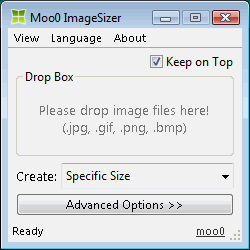 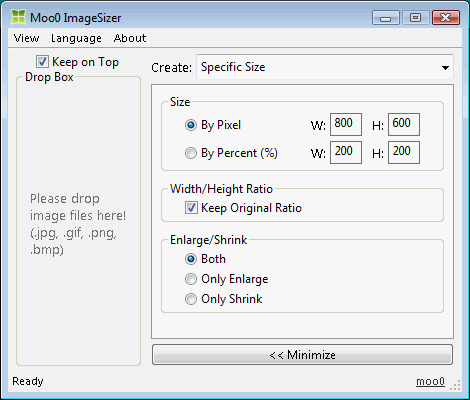
| Μετατροπή διαστάσεων εικόνων Το Moo0 - Αλλαγή διαστάσεων εικόνας σας επιτρέπει να μετατρέψετε εικόνες σε διαφορετικές διαστάσεις. Είναι πολύ εύκολο στη χρήση, καθώς, αρκεί απλά να σύρετε αρχεία στο παράθυρο του προγράμματος. Το εργαλείο αυτό μπορεί να είναι πολύ ισχυρό, αν εργάζεστε στο σχεδιασμό και αναρωτιέστε ποια από τα μεγέθη να διαλέξετε. Αυτό το πρόγραμμα έχει μεταφραστεί από το «geogeo.gr - Δωρεάν προγράμματα με Ελληνικά». Παρακαλούμε επισκεφθείτε την ιστοσελίδα του και δείξτε την ευγνωμοσύνη σας προς αυτό.
Η υποστήριξη Norwegian κατέστη δυνατή χάρη στον Øistein. Πραγματικά ευχαριστούμε πολύ!! Η υποστήριξη Ισπανικών κατέστη δυνατή χάρη στον Descko. Πραγματικά ευχαριστούμε πολύ!! | |||||||||||||
| Τίτλος σελίδας: | ||||||||||||||
| URL σελίδας: | ||||||||||||||
| Ετικέτα HTML: | ||||||||||||||
| Γλώσσα: | Αραβικά, Λευκορωσικά, Πορτογαλικά Βραζιλίας, Βουλγαρικά, Κινεζικά (απλοποιημένα), Κινεζικά (παραδοσιακά), Croatian, Τσεχικά, Δανικά, Ολλανδικά, Αγγλικά, Estonian, Finnish, Γαλλικά, Γερμανικά, Ελληνικά, Hebrew, Hindi, Ουγγρικά, Ινδονησιακά, Ιταλικά, Ιαπωνικά, Κορεατικά, Norwegian, Περσικά, Πολωνικά, Πορτογαλικά, Ρουμανικά, Ρωσικά, Serbian (Cyrillic), Σλοβακικά, Slovenian, Ισπανικά, Σουηδικά, Thai, Τουρκικά, Ουκρανικά, Βενετικά, 2 other languages (partial) - [ Μεταφραστές (26) ] | |||||||||||||
| Λ.Σ.: | Windows XP/2003/Vista/7/8.1/10 | Ευκολία χρήσης: | Πολύ εύκολο | |||||||||||
| Έκδοση: | 1.24 | |||||||||||||
| Τελευταία ενημέρωση: | 2019/06/28 [ Ιστορικό ενημερώσεων (21) ] | |||||||||||||
| Αρχείο PAD: | [ Εάν λειτουργείτε τοποθεσία με λίστα λογισμικού... ] | |||||||||||||
| Λήψη: |
| |||||||||||||
| Μέγεθος: | 3.59 MB | |||||||||||||
| Άδεια: | Δωρεάν (Μη εμπορική χρήση μόνο) Χρήση σε χώρο εργασίας / καφετέρια με διαδίκτυο;
| |||||||||||||
| Σχόλια: | ||||||||||||||
| Συνήθεις ερωτήσεις: | ■ (Symptom) The program suddenly doesn't start up one day? stopped working properly? on Windows 10/8.1? This probably happens when "Windows SmartScreen" hinders our program from working. In this case, please try the following before the installation. 1. Before the installation, right-click on the installer file and open the file "Property". 2. At the bottom of "General" tab, if you see "Security: This file came from another computer...", select "Unblock" check box, and "Apply" and "OK". 3. If you install the program after it, it may be able to prevent many problems caused by "Windows SmartScreen" or some other security products. Or, you can actually turn off this problematic feature of Windows itself: (only if you feel too troublesome to do this every single time.) https://ugetfix.com/ask/how-to-disable-windows-smartscreen/ This happens to every software vendor who doesn't or can't donate $300 to Microsoft every single year (EV signature purchase), and especially when the program file is still new. This kind of problems started to get reported since the early of 2019. | |||||||||||||
